
Your Account, All in one Place
Manage and pay your Electric, Water, Sewer, and Broadband bills online.
Access Your Account Online
You can manage and pay your Electric, Water, Sewer, and Broadband bills online.
New Users
To register your account:
Note: You cannot currently register a broadband-only account, but you can make payments once your electric or water account is registered.
Existing Users
Log in with your username and password to:
Payments made by checking, savings, or e-check are FREE
A 3% convenience fee applies to all credit/debit card payments
Make a One-Time Payment
No login required. Just use your account number.
Payments by checking, savings, or e-check are FREE
A 3% convenience fee applies to all credit/debit card payments
Billing FAQs
Sign up for new electric and/or broadband service.
Follow the links to sign up for:
Add account designee.
Complete this form to authorize another person, such as a spouse or roommate, to obtain your account’s billing and usage information. Privacy laws require the account owner only to complete and return this form.
Set up direct debit.
Sign up to set up monthly automatic payments for your electric, broadband and/or water bills.
- ACH: Complete the direct debit authorization form.
- Credit/Debit: Complete the credit card authorization form.
Return your completed form to us (ACH must include a voided check):
Email: Businessoffice@norwoodlight.com
Fax: 781-769-0660
In Person: 136 Access Road, Norwood, MA
What should I do if I’m moving?
Moving in. If you are moving into Norwood, welcome! Sign up for electric service first, and then sign up for our broadband service for high-speed internet, HD cable TV and digital telephone.
Water accounts are always billed to the property owner. If ownership has changed, the account will be updated per the Assessors Department after the deed for the property has been filed. These updates are done monthly. As a result, any interim bill will be sent to the homeowner.
Moving out. We are sorry to see you go, but before you do please contact us to cancel service:
- Electric – Call our office at 781-948-1200, 10 days prior to your move to schedule a final reading for your electric service.
- Water – Call the Department of Public Works at 781-762-1413, 10 days prior to your move to schedule a final reading for your water service.
- Broadband – Return all equipment (boxes, remote controls, power cords, etc.) to our office at 136 Access Road between the hours of 7:45 am – 4 pm Monday through Friday.
Why does my electric bill seem higher than usual?
A higher than usual bill may be due to the seasons, holidays and billing periods.
Seasonal Reasons:
- Cold weather can increase you bill by more than 10% if you use electric heat.
- Shorter days increase the need for lighting.
- Heavier, winter clothing requires a longer time in an electric dryer.
- During holidays, more electricity is used for cooking, cleaning, lighting, heating and entertaining.
- Indoor activities use more energy for lighting, cooking and entertaining.
- Hot, humid weather can increase cooling costs by 10% or more.
Billing Periods:
A typical billing period is between 29 and 31 days. Holidays and other factors beyond our control may make a billing period up to 35 days long. An additional five days can increase a bill by 17%.
When should I receive my bill?
- Electric Bills are mailed based on your account number.
- Accounts beginning with 011 through 102, 232, 233 and 241 are mailed on the 6th of each month.
- Accounts beginning with 111 through 221, 231, 251 and 252 are mailed on the 24th of each month.
- Water Bills are mailed the 15th of each month.
- Broadband Bills are mailed on the 2nd of each month.
Please allow up 3 business days for delivery of your bill. Please note these dates may be adjusted for weekends and/or holidays.
What do I do if I think my bill is incorrect?
Please contact the billing office.
Call: 781-948-1200
Email: info@norwoodlight.com
Visit: Norwood Light, 136 Access Rd., Norwood, Monday – Friday, 7:45 am – 4 pm
Electric & Water User Portal
Click Here to track usage and identify trends in your energy and water consumption to better control your monthly bill. Free for Norwood Light customers. Register to get started.
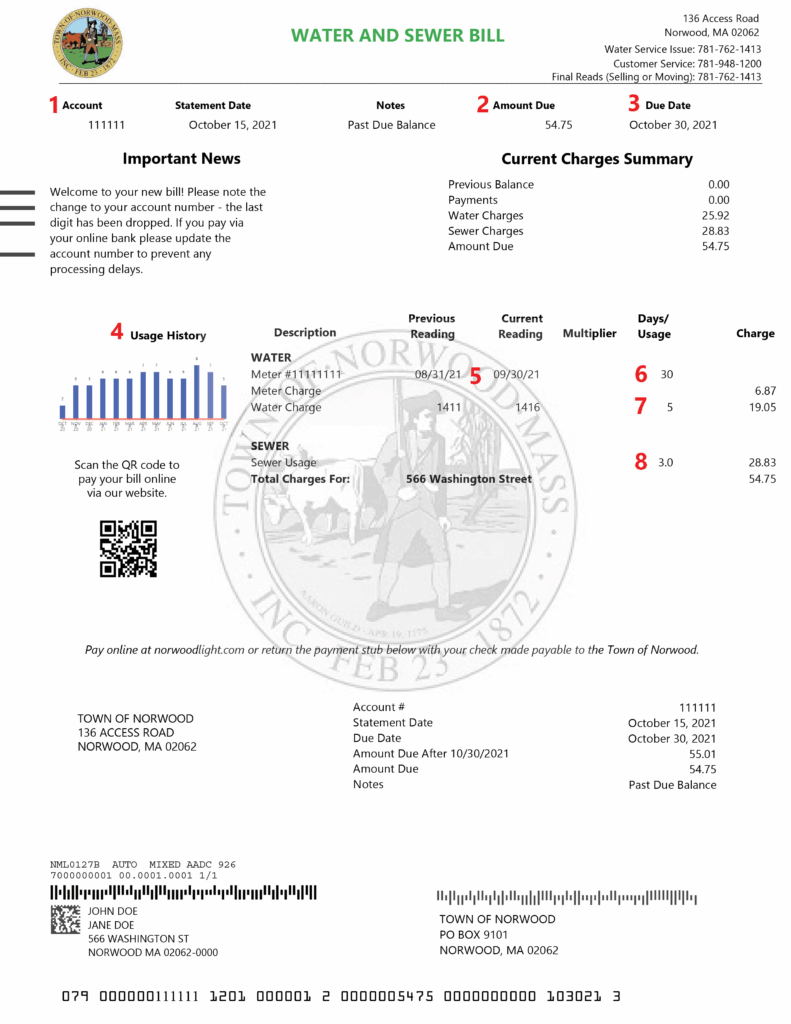
How to read my water bill?
- Account Number: Reference this number in any written or phone correspondence.
- Amount Due: Amount to be paid by the due date.
- Due Date: Payment due date.
- Past Water Use: Actual usage billed for previous twelve months. The greater the number of service days in the billing period the higher the usage will be.
- Service Period: Dates included in this billing period.
- Service Days: Total number of days in this billing period.
- Water Use: Current reading minus previous reading.
- Sewer Use: Calculated as 60% of water use.
How to read my broadband bill?
Click Here for “How to Read my Broadband Bill” PDF
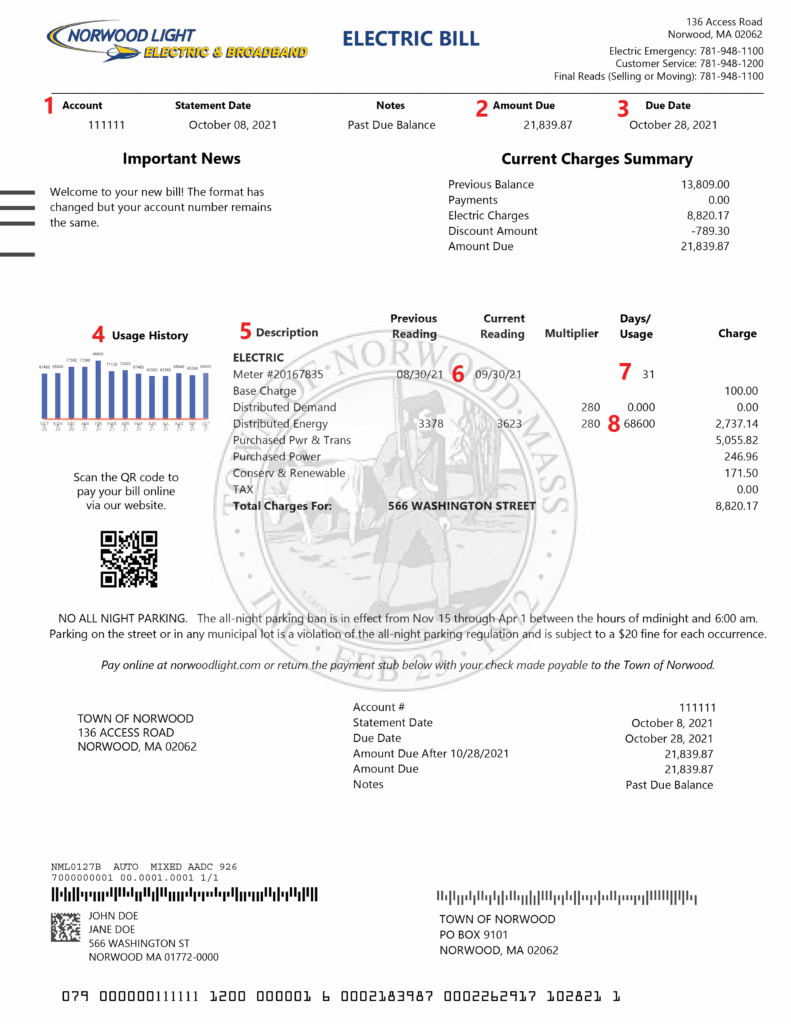
How to read my electric bill?
- Account Number: Reference this number in any written or phone correspondence.
- Net Amount Due: Amount to be paid by the due date. Payments made after due date will lose the discount.
- Due Date: Payment due date.
- Usage History: Total kWh per month for the previous twelve months.
- Description: Detailed breakdown of current charges.
- Service Period: Dates included in this billing period.
- Service Days: Total number of days included in this billing period.
- kWh Used: Current reading minus previous reading.
How to pay my bill.
You are able to pay bills in various ways:
- Click Here to Pay Online
- Phone 24/7 by calling 877-885-7968
- Cash or check at Town Hall Treasurer’s Office – 566 Washington St
- Monday through Friday 8:15 am – 3:30 pm
- E-check or credit card at the Norwood Light Dept – 136 Access Rd.
- Monday through Friday 7:45 am – 4:00 pm
I moved. How do I move my Norwood Light Broadband Fiber service to my new address?
Norwood Light Broadband only services the community of Norwood, MA. If you are moving within the Norwood community. To start your move process, contact our customer support team at 781-948-1150 and press option 2.
Will I receive a paper bill?
We send a paper bill by default. You can sign up for email billing. If you choose to sign up for email billing and ACH automatic payment you will receive a $5 credit towards your monthly bill. (This $5 credit is for fiber internet customers only, not legacy internet.)
What payment options do I have?
- Credit/Debit cards with a Visa®, American Express®, Discover®, or MasterCard Logo® (3% service fee added to all credit/debit card payments)
- Electronic check payments (will need routing number and checking account number)
- Automatic Withdrawal from checking or savings account (Customers with Automatic Withdrawal and email billing will receive $5.00 credit towards monthly bill)
- Check payments mailed thru the US Post Service
- Pay in person at the Town Hall or Light Department
- Pay by phone 781-948-1150 with e-check or credit/debit card (fees apply)
Why is my first bill higher than expected?
We bill each month’s charges in advance. As an example, if you sign up in September you will not receive your first bill until the first week of October in which it will show prorated charges for the month of September and a full month’s charges for October. This is due to the date your service started. If your installation was completed before your billing cycle began, your first bill will be a little higher. Don’t worry, this only happens once. Your next bill will be back to normal.
How and when will I be billed?
Monthly on the first business day of each month.
How do I change my plan?
You can call us at 781-948-1150 and press option 2. Our representatives will be happy to assist you with making any changes to your service. There is no charge to change plans. We simply adjust your bill next month to reflect the change.
How do I sign in to manage my account?
Sign into https://mybroadbandaccount.com/norwoodlight/ website with the email address and password associated with your account. If you have not logged in before. Please click on Register for the first time. If you have forgotten your password, click on Forgot your password?. For any other issues please call us at 781-948-1150 and we will be happy to assist you.
